
Java Arrays
Congrats, you have reached now the final part of our tutorials. In these tutorials, we will be discussing arrays. Arrays are an important thing to learn because you will use them for the rest of your programming life. So far, when we want to create a variable, we declare it by giving it a type, a name, and maybe an initial value. However, consider the case where your program needs 1000 integers to operate on. Obviously, you will not create 1000 integer variables because then no one will become a Computer Scientist. Therefore, arrays are made to help us to do so.
Array Uses and Code
From the example above, you may have guessed what an array is used for. An array is used if we need to many variables. We create an array and give it a type. To make things clear, an array is like a one row table. Each column contains a value and have an index pointing to it. For example, check the illustration below.
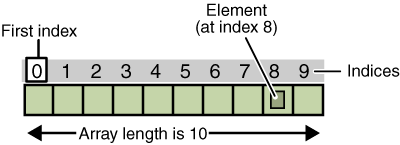
As you can see, the array contains 10 elements. However, we always begin at index zero and not one. Each cell contains an element and that element is pointed to by the index. Enough talking, time for coding.
public class ArrayExample

{

   public static void main(String args[])

   {

      int A[] = new int[10];

   }

}
Let's explain what we are doing here. First of all, using the [] near a variable name means that we are creating an array. In this code, we are declaring an array of type integer.
Now comes the real part of declaring an array. new int[10]; specifies that we are declaring a new array of type integer and it should hold 10 elements just like the illustration above.
Adding Elements in an Array
Now that we have created an array, it is time to put values in it. Let's see how to add elements to an array.
public class ArrayExample

{

   public static void main(String args[])

   {

      int A[] = new int[10];


      A[0] = 1;

      A[1] = 9;

      A[2] = 6;


      System.out.println(A[0]+" "+A[1]+" "+A[2]+" "+A[3]);

   }

}
Output:
1 9 6 0
Notice that A[3] was a zero. This is because Java initializes every elements in an integer array to zero.
Anyway, to add an element to an array we indicate the array cell we want to add to and we assign a value to it. For example,
A[index] = value;
Lets take an example where we take input from the user.
import java.util.Scanner;


public class ArrayExample

{

   public static void main(String args[])

   {

      Scanner input = new Scanner(System.in);


      int A[] = new int[5];


      System.out.println("Please enter 5 numbers");
      A[0] = input.nextInt();

      A[1] = input.nextInt();

      A[2] = input.nextInt();

      A[3] = input.nextInt();

      A[4] = input.nextInt();


      int sum = A[0]+A[1]+A[2]+A[3]+A[4];


      System.out.println("The sum of the numbers is "+sum);

   }

}
Output:
Please enter 5 numbers

1

2

1

1

1

The sum of the numbers is 6
Congratulations
You now know the importance of using arrays and how to create and add to an array. Move on to the next tutorial but first check the following important notes.
Important Notes
Array Index
As we said, an array is a one row table with each column having an index. If you try to access an index that is outside the array's length or that is negative, this will result in a runtime error.
Naming an Array
An array is like any other variable, it should be given a meaningful name to know what it is used for.